Most conversations about SEO are about adding things: more content, more keywords, more links. But a lot of lost traffic is not about what is missing. It is about what is quietly broken. Pages that return errors, redirects that leak authority, and pages so slow that people leave before they load.
We do this cleanup constantly for a B2B software client with a large site, and it is often the fastest way to win traffic back. No new content, just fixing what already exists. Here is what actually matters and how to work through it.
Why technical SEO problems quietly cost you traffic
Search engines have to crawl your site, understand it, and trust that visitors will have a good experience. Every broken link, bad redirect, or slow page chips away at one of those. The damage is rarely dramatic. It is a slow leak, which is exactly why it goes unnoticed for months. You do not see a page vanish. You see rankings drift down and blame the algorithm.
The good news is that this kind of problem is fixable, and the wins are often quick, because you are removing friction rather than waiting for new content to earn its place. It is the part of our SEO work that pays back the fastest.
Broken links and 404 errors: the traffic leak most sites ignore
A 404 is what a visitor gets when a page no longer exists. A few are normal. A lot of them, especially ones that other sites or your own pages still link to, waste the authority those links were passing and send visitors into a dead end.
The fix is not complicated:
- Find them. A crawl of your site surfaces internal links pointing at dead pages, and Google Search Console shows the 404s Google is still hitting.
- Decide per page. If a broken URL has a clear replacement, redirect it there. If it does not, make sure nothing on your site still links to it.
- Fix the source. A broken internal link is worth fixing at the link itself, not just papering over it with a redirect.
Old, forgotten 404s that still have links pointing at them are some of the easiest traffic you will ever recover.
Redirects done right, and the redirect chains that hurt you
Redirects are how you move a page without losing its traffic or its ranking. Done right they are invisible. Done wrong they cause two common problems.
The first is using the wrong type. A permanent move should use a permanent (301) redirect, so search engines pass the old page's authority to the new one. A temporary redirect tells them not to, which quietly wastes it.
The second is chains. Page A redirects to B, which redirects to C, which redirects to D. Every hop slows the visitor down and dilutes what reaches the final page.
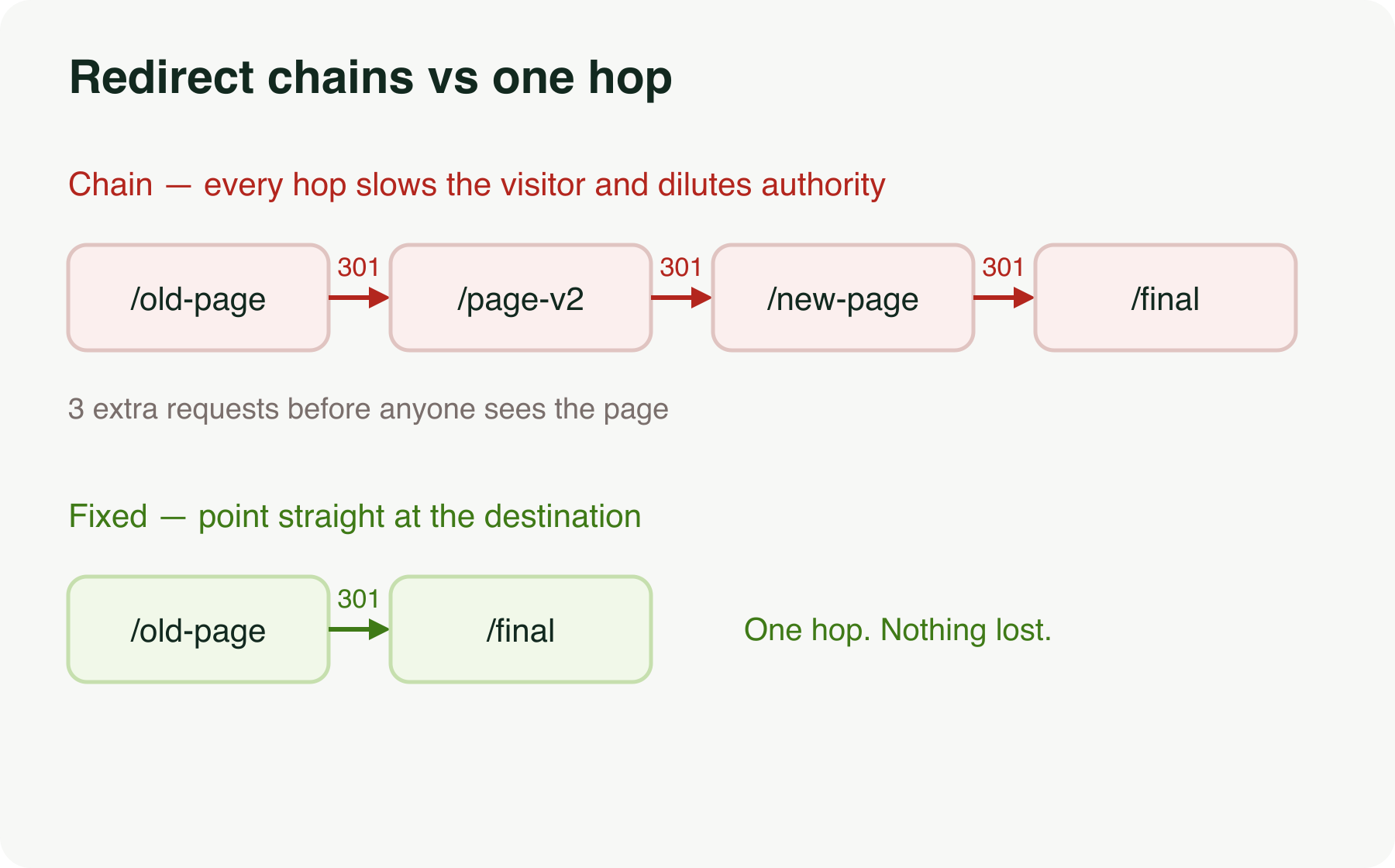
Redirects should point straight at the final destination in one step, like the second row above. Cleaning up chains on a site that has moved pages over the years is dull work that reliably pays off.
Core Web Vitals: what Google measures and what to fix
Core Web Vitals are Google's way of putting numbers on how a page feels to a real person: how fast the main content loads, how quickly the page responds when you tap or click, and whether things jump around while it loads. Google uses them as a ranking signal, and more to the point, people leave pages that fail them.
You do not need to memorise the metrics. You need to know what usually breaks them:
- Slow loading is usually huge unoptimised images, heavy scripts, or a slow server.
- Sluggish response is usually too much JavaScript running while the page is trying to load.
- Things jumping around is usually images and ads without reserved space, so the layout shifts as they appear.
Google's own Core Web Vitals guidance is the reference for the exact thresholds. Most of the fixes are a job for whoever builds your site, which is where technical SEO and web development meet.
A technical SEO checklist to run every quarter
You do not need to do this weekly. Once a quarter keeps most sites clean:
- Crawl the site and fix new broken internal links.
- Check Search Console for new 404s and crawl errors.
- Look for redirect chains and shorten them to one hop.
- Re-run Core Web Vitals on your most important pages.
- Confirm your key pages are still indexed and showing in search.
None of this is glamorous. All of it protects traffic you already earned, which is cheaper than earning it twice.
Losing traffic and not sure why?
If your rankings are drifting and the content looks fine, the problem is often underneath, in the technical layer most people never check. That is exactly the kind of audit we run. Tell us about your site and we will find what is leaking. Get in touch to start.