Bigin and Zoho CRM come from the same company, run on the same platform, and can even share data. They are built for very different businesses, and picking the wrong one costs you either money or months.
We set up both for clients. This is the comparison we walk people through on the first call: what each one is, where they differ, what they cost, and how to decide.
The short answer
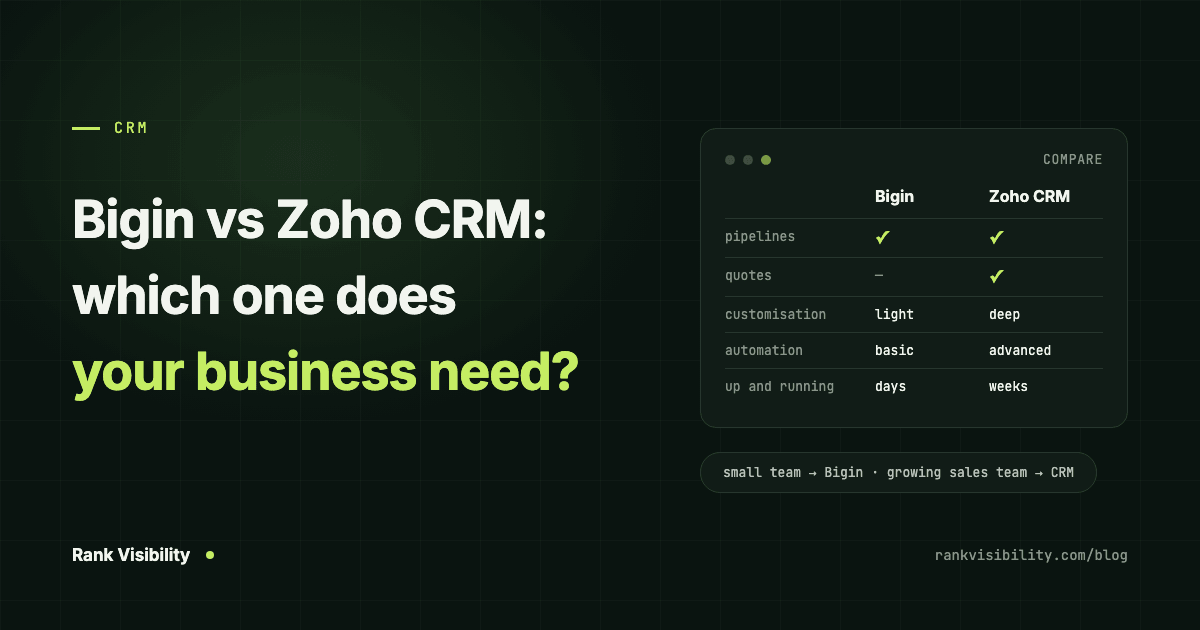
Choose Bigin if you are a small team, you sell through a fairly simple pipeline, and you want something running in days that people will actually use.
Choose Zoho CRM if you need quotes and sales orders inside the CRM, lead scoring, forecasting, custom modules, or approval processes, or if your sales team is large enough to need territories and detailed roles.
Most businesses moving off spreadsheets belong in Bigin. Most businesses already outgrowing a basic CRM belong in Zoho CRM.
What is Bigin?
Zoho describes Bigin as "an offshoot of Zoho CRM", a pipeline-centric CRM built and priced for small businesses. Everything starts from the pipeline: a deal moves from enquiry to won, and the contacts, calls, emails, tasks and WhatsApp messages hang off it.
There is very little to configure, and that is deliberate. A small team can learn it in an afternoon. We cover what we build into it on our Bigin by Zoho page.
What is Zoho CRM?
Zoho CRM is the full product. Zoho has run it since 2005, and it is built for growing businesses and larger sales teams. It is organised around modules, such as leads, contacts, accounts, deals, quotes and invoices, and almost everything can be customised: fields, layouts, modules, buttons, validation rules and processes.
That power comes with setup time. A Zoho CRM that nobody configured properly is often harder to use than a spreadsheet.
Bigin vs Zoho CRM pricing
These are the prices on Zoho's own Bigin and Zoho CRM comparison page as of October 2026, per user per month, billed yearly, in US dollars. Local taxes are added on top, and prices in India, the UAE and other regions are set separately, so check the page for your country.
Bigin
- Bigin Free: free for 1 user
- Bigin Express: US$7
- Bigin Premier: US$12
- Bigin 360: US$18
Zoho CRM
- Zoho CRM Free: free for 3 users
- Zoho CRM Standard: US$14
- Zoho CRM Professional: US$23
- Zoho CRM Enterprise: US$40
- Zoho CRM Ultimate: US$52
On a five-person team, Bigin Premier costs about half of Zoho CRM Professional. Over a year that difference adds up, but it matters less than whether the tool fits. A cheap CRM nobody uses is the most expensive option.
The main differences between Bigin and Zoho CRM
Going by Zoho's own feature comparison, these are the differences that change the decision in practice.
Pipelines vs modules
Bigin gives you team pipelines, 3 on Express, 5 on Premier and 15 on Bigin 360, and you work deal by deal. Zoho CRM gives you modules and records, and you design how they connect. If your sales process fits on a whiteboard as five columns, Bigin is the more natural fit.
Customisation
Bigin allows 10 custom fields per module on Express, 25 on Premier and 50 on Bigin 360, and no custom modules. Zoho CRM Professional allows 155 custom fields per module and 25 custom modules, rising sharply on Enterprise and Ultimate. If you track a lot of business-specific data, such as machine specs, policy details or project stages, Bigin can run out of room.
Quotes, orders and invoices
Zoho CRM Professional and above has price books, quotes, sales orders and purchase orders built in. Bigin does not. It handles sales orders through Zoho Books and invoices through Zoho Invoice instead. If your team sends a lot of quotes from inside the CRM, that alone often decides it.
Automation and process control
Bigin has workflow rules, 30 on Express up to 100 on Bigin 360, plus stage transition rules on the higher plans. Zoho CRM adds Blueprint for step-by-step sales processes from Professional, approval processes from Enterprise, and webhooks and custom functions from Standard. When automation runs out in either one, tools like n8n, Make and Zapier fill the gap, which is the kind of work our AI and workflow automation team does.
Sales management features
Lead scoring and sales forecasting are only in Zoho CRM, not in any Bigin plan. So are territory management and field-level security, from Enterprise and Professional respectively. A small team rarely misses these. A sales manager running fifteen reps usually does.
WhatsApp and other channels
Both support WhatsApp integration on paid plans, along with email and calls. Bigin also includes things small teams use daily, like booking pages, pipeline forms and lead ads from Facebook, LinkedIn and TikTok on its paid plans. For many small businesses, getting WhatsApp conversations into the CRM is the single most useful feature. We wrote about why in our post on using WhatsApp to get repeat orders from B2B customers.
When Bigin is the right choice
- You are moving off spreadsheets, sticky notes or your phone for the first time.
- One to ten people will use it, and most of them are not full-time salespeople.
- Your sales process is a handful of stages, with maybe two or three pipelines.
- You want it live in a week or two, not a quarter.
- You care more about follow-ups not slipping than about detailed reporting.
When to go straight to Zoho CRM
- You need quotes, price books and sales orders inside the CRM.
- You want lead scoring, forecasting or territories.
- Your process has approvals, such as discounts that need a manager's sign-off.
- You track a lot of custom data that will not fit in Bigin's field limits.
- You have a sales team with managers, regions and roles.
Can you start on Bigin and move to Zoho CRM later?
Yes. Zoho says businesses that outgrow Bigin can switch to Zoho CRM and bring their data and preferences across. Bigin is also included in Zoho One, and you can run Bigin and Zoho CRM side by side with data synced through Zoho Flow.
That makes Bigin a low-risk starting point. The real cost of switching later is retraining the team and rebuilding automations, so if you can see clearly that you will need Zoho CRM within a year, it is usually cheaper to start there.
Our take
For most small businesses we talk to, Bigin is the right first CRM. It is cheap, quick to set up, and simple enough that people keep using it after the first fortnight, which is where most CRM rollouts fail. We recommend Zoho CRM when the business clearly needs quotes, approvals or heavy customisation, and we say so on the first call rather than selling the wrong tool.
If you want help choosing or setting either one up, our Bigin setup page covers how we build Bigin around the way you sell, and our CRM and business tech service covers Zoho CRM and other platforms. Or tell us how your team sells and we will tell you which one fits.