A client sends us a screenshot of their Zapier invoice. They started on the cheapest paid plan to push website enquiries into their CRM and send a WhatsApp alert to sales. Six months later, after adding a few more steps and a busier ad campaign, the bill had gone up several tiers. Nothing broke. The workflows just got more popular, and Zapier charges for every step that runs.
That is the heart of the n8n vs Zapier question, and Make sits right in the middle of it. All three connect your apps and move data without anyone copying and pasting. Where they differ is how they count usage, how much technical comfort they expect, and who holds your data. This guide covers pricing units, ease of use, integrations, AI agent features and self-hosting, then tells you which one we would pick for different kinds of small business.
The short answer
- Pick Zapier if nobody on your team wants to touch anything technical, your volumes are low, and you need a niche app that only Zapier connects to. It is the fastest to set up and the most expensive to grow on.
- Pick Make if you want a visual builder with branching and loops, are happy to spend an afternoon learning it, and want much lower running costs than Zapier.
- Pick n8n if your workflows have many steps, run often, include AI, or handle customer data you would rather keep on your own server. It has the lowest cost at scale and the steepest learning curve.
For most of the small businesses we work with, the answer ends up being n8n, usually set up by someone who has built a few before. That is also why our AI and workflow automation service is built around it.
How each tool charges: tasks, credits and executions
This is the part most comparisons skim over, and it decides your bill more than the headline price does.
Zapier: tasks. Zapier's pricing page says each successful step in a Zap consumes tasks from your monthly allowance. A Zap with one trigger and four actions uses four tasks every time it runs. Run it 2,000 times a month and you have used 8,000 tasks. AI by Zapier and Code by Zapier steps draw from the same pool.
Make: credits. Make switched its billing unit from operations to credits in August 2025. Make's pricing page explains that most module actions use one credit, so reading a record, writing a sheet row and sending a message each count. Routers and error-handler modules are free. Some AI features use more than one credit. Unused credits expire at the end of the term.
n8n: executions. n8n bills per workflow execution, which its pricing page defines as one run of the whole workflow, however many steps it has. A two-step workflow and a twenty-step workflow cost the same per run. Test runs in the editor do not count.
A worked example
Take one common small-business workflow: a new lead arrives from a Meta lead form, gets added to the CRM, is tagged by source, triggers a WhatsApp message, and posts an alert to the sales team. That is a trigger plus four actions, running 2,000 times a month.
- Zapier: 4 actions × 2,000 runs = 8,000 tasks. That needs the 10,000-task tier, which is $129 a month on Pro billed annually.
- Make: roughly 5 modules × 2,000 runs = 10,000 credits. That fits the entry Core tier, $12 a month billed annually on Make's US price list.
- n8n Cloud: 2,000 executions. That fits Starter, €20 a month billed annually.
- n8n self-hosted: no execution meter. You pay for the server and for whoever looks after it.
Same workflow, roughly a tenfold difference. Add a sixth step and only the Zapier bill grows.
Zapier pricing, Make pricing and n8n pricing as of November 2026
Figures below are from the official pricing pages as of November 2026. All three change tiers often, so check on the day you buy.
Zapier pricing
Zapier's pricing page lists:
- Free: 100 tasks a month, two-step Zaps only.
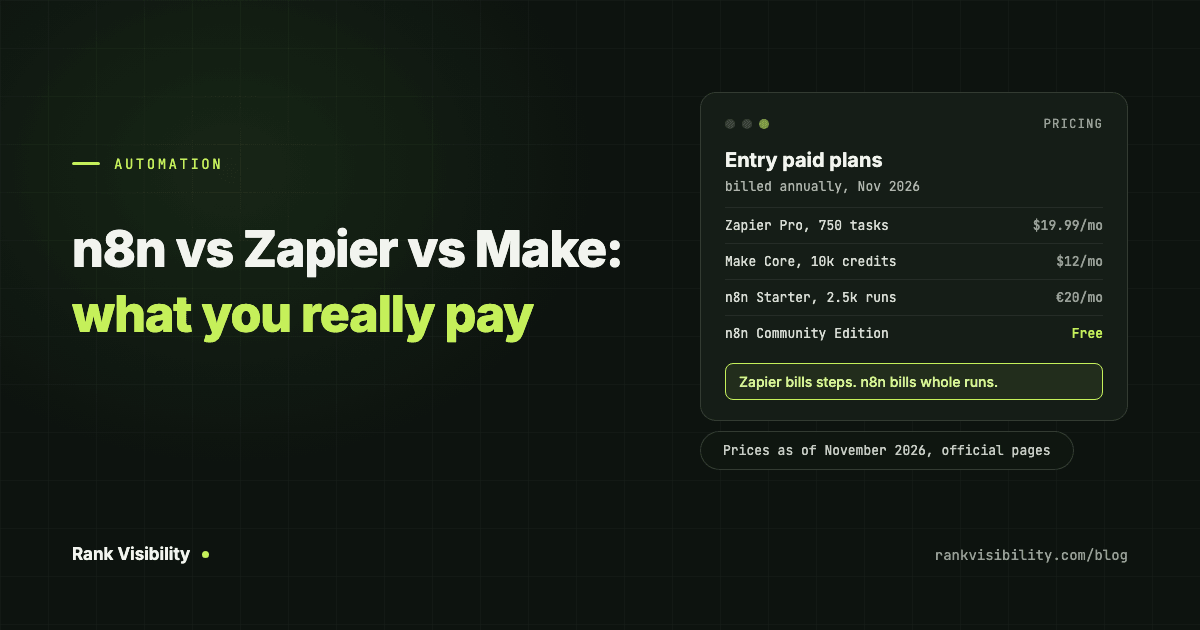
- Professional: from $19.99 a month billed annually ($29.99 monthly) for 750 tasks. Adds multi-step Zaps, premium apps, webhooks and AI by Zapier. 2,000 tasks costs $49 a month annually, 10,000 tasks costs $129.
- Team: from $69 a month annually for 2,000 tasks, with up to 25 users and shared connections.
- Enterprise: custom.
If you go over your task limit on a paid plan, Zapier switches you to pay-per-task billing for the rest of the period so your Zaps keep running. Zapier Agents is a separate add-on billed in "activities" rather than tasks, with a free allowance of 400 activities a month.
Make pricing
Make's pricing page uses a credit slider, and the prices shown depend on your country. On the US list at 10,000 credits a month, as of November 2026:
- Free: 1,000 credits a month, two active scenarios, runs no more often than every 15 minutes.
- Core: $12 a month billed annually ($16 monthly). Unlimited active scenarios, scheduling down to one minute.
- Pro: $21 a month annually ($28 monthly). Adds priority execution and full-text log search.
- Teams: $38 a month annually ($51 monthly). Adds team roles and shared templates.
- Enterprise: custom.
Make shows different price lists by region. Its own comparison pages quote paid plans "starting at $9", which is the lowest regional list, so buyers in India or the UAE may see lower numbers or different plan names. Check the slider from your own location.
n8n pricing
n8n's pricing page lists prices in euros. Every plan includes unlimited users, unlimited workflows and every integration:
- Starter (Cloud): €20 a month billed annually for 2,500 executions, 5 concurrent executions.
- Pro (Cloud): €50 a month billed annually for 10,000 executions.
- Business (self-hosted only): €667 a month billed annually for 40,000 executions, adding SSO, Git version control and multiple environments. Companies under 20 staff may qualify for 50% off through n8n's startup plan.
- Enterprise: custom, cloud or self-hosted.
- Community Edition: free to self-host.
Annual billing saves 17% on n8n Cloud. Cloud data is stored in Frankfurt, according to n8n's pricing FAQ.
Is n8n free?
Yes, in one specific sense. The Community Edition is the self-hosted version of n8n, published on GitHub, and you can run it on your own server without paying n8n anything or hitting an execution cap. It is released under n8n's Sustainable Use License, which allows use for your own business's internal automation.
You give up mostly team and governance features: SSO, Git version control, separate environments and some sharing controls. With one or two builders, these rarely matter.
The real cost is not the licence. Someone has to set up the server, install updates, take backups and fix it at 9pm when a webhook stops responding. If that someone is you and you have never touched Docker, n8n Cloud at €20 a month is the cheaper option once you count your time. If you have a developer or an agency managing it, self-hosting is hard to beat. n8n's hosting docs cover the options.
Ease of use: who can actually build in each tool?
Zapier is the easiest. Pick a trigger, pick an action, map a few fields, done. Its Copilot drafts a Zap from a plain-English description. Things get awkward once you need loops, complex branching or data clean-up, because the editor is built around straight lines.
Make gives you a visual canvas where modules connect like a flowchart. Routers split the flow, iterators loop over lists, and you can see the data passing through each step. It takes a few hours to get comfortable, but non-developers do learn it. Most people who outgrow Zapier's simplicity find Make the easier step up.
n8n also uses a node-based canvas, but assumes more. You will meet JSON, expressions and, sooner or later, a Code node for JavaScript or Python. That is where its flexibility comes from, and why many owners hand it to a specialist. In our experience, owners maintain n8n workflows comfortably once someone has built them cleanly and labelled every step. Want your team building their own? Our AI training for business teams covers it.
Integrations: how many apps does each connect to?
- Zapier: its pricing page refers to 9,000+ apps. This is its biggest advantage. If you use a small, regional or industry-specific tool, Zapier is the most likely to have a ready connector.
- Make: its pricing page says 3,000+ native apps, plus custom apps for anything with a public API.
- n8n: its homepage lists 500+ native integrations, with a larger directory that includes community-built nodes, and an HTTP Request node that connects to any REST API.
The raw numbers flatter Zapier. Most small businesses run on the same core stack: Google Workspace, a CRM, WhatsApp, Meta lead forms, an accounting tool, maybe Shopify. All three cover these. When n8n lacks a native node, we call the app's API directly, which often exposes more fields than a pre-built connector.
If your CRM is still undecided, sort that first. Our Bigin vs Zoho CRM comparison helps with that choice, and both connect well to all three automation tools.
AI and agent features compared
All three now market themselves as AI platforms. The differences are in how deep you can go.
Zapier offers AI by Zapier steps inside Zaps (drawing on your task pool), plus Zapier Agents, Chatbots and an MCP server as separate products with their own allowances. Agents can act across its app library, which suits simple assistant-style jobs.
Make has AI Agents, the Maia AI assistant for building scenarios, and an MCP server. Some AI modules use more than one credit, so AI-heavy scenarios burn through allowances faster than you might expect.
n8n goes furthest for custom AI work. Its AI Agent node can use other nodes as tools, it supports vector stores for retrieval from your own documents, it can call cloud or local models, and every Cloud plan includes agents, MCP and AI nodes. You can add human approval before an agent takes an action. Because you pay per execution, a 15-step agent workflow costs the same per run as a simple one.
For a practical example: we build lead-qualification flows where an AI step reads an enquiry, scores it, drafts a WhatsApp reply and routes hot leads to a salesperson. In n8n that is one execution per lead. In Zapier it is a task for every step plus AI usage on top. If WhatsApp is part of your setup, our breakdown of WhatsApp Business API pricing covers the messaging costs that sit alongside the automation tool.
Self-hosting and data control
- Zapier is cloud-only. Your data passes through Zapier's infrastructure.
- Make is cloud-only too, with no self-hosted version for small businesses.
- n8n can run on n8n's cloud or on a server you control, in the region you choose.
This rarely decides things, until you handle patient records, financial data or client lists you are bound to protect. Clinics, finance firms and Dubai brokerages often ask us where their lead data physically sits. With self-hosted n8n the answer is simple: on your server, in the region you picked. Our guide to real estate CRMs in Dubai touches on why that matters for brokerages handling large contact lists.
Which is better: n8n, Make or Zapier?
Here is how we decide for clients.
Zapier fits when:
- You need fewer than a few hundred tasks a month.
- You rely on an app only Zapier connects to.
- Nobody will maintain anything more complex, and speed of setup matters more than cost.
Make fits when:
- Your workflows branch and loop, and you want to build them yourself visually.
- You want low running costs without managing a server.
- You are comfortable checking credit usage now and then.
n8n fits when:
- Workflows have many steps or run thousands of times a month.
- AI agents, document lookups or custom API calls are involved.
- Data control matters, or you want a fixed server cost instead of a growing usage bill.
- You have a developer, or an agency, to build and maintain it.
A common path: start on Zapier, hit the task wall, move to Make or n8n. If you know volumes will grow, starting on n8n saves the migration. When we set up automation alongside a CRM rollout through our CRM and business tech service, we usually wire the CRM to n8n from day one so the lead flow never has to be rebuilt.
Frequently asked questions
Is n8n just a cheaper Zapier?
No. Both connect apps and automate work, but n8n is closer to a developer tool with a visual editor. It bills per full workflow run rather than per step, can be self-hosted, and lets you write code inside workflows. Zapier is simpler and has far more ready-made app connectors.
Why is Zapier so expensive?
Because it charges per task, and every action step in a Zap is a task. A five-step Zap running 2,000 times a month uses thousands of tasks, which pushes you up the pricing tiers quickly. You are paying for convenience and the largest app library.
Is n8n free to use?
The self-hosted Community Edition is free, with no execution limit set by n8n. You pay for the server and its upkeep. n8n Cloud, where n8n runs it for you, starts at €20 a month billed annually for 2,500 executions.
What is the difference between n8n and Make?
Both use visual canvases and both are much cheaper than Zapier at volume. Make bills per credit, usually one per module action, and is cloud-only. n8n bills per whole workflow run, can be self-hosted, and goes further with code and AI agent workflows. Make is easier for non-developers to learn.
What are the best Zapier alternatives for a small business?
Make and n8n are the two we recommend most. Make suits owners who want to build workflows themselves without code. n8n suits businesses running high-volume or AI-heavy workflows, or those who want to self-host.
Get your automations built properly
Picking the tool is the easy part. The value comes from choosing the right workflows, building them so they don't fail silently, and keeping costs predictable. We build n8n workflows for small businesses in India, the UAE and abroad, from lead routing and CRM updates to AI agents that qualify enquiries.
See how our AI and workflow automation service works, or get in touch and tell us which tasks your team keeps doing by hand.